Lab 1: Review of Scientific Computing in Python#
This lab is adapted from AM207 (Harvard). Data files are in the book’s data/ folder. Worked solutions are collapsed: try each exercise before expanding them.
In this lab
What Is Data?
Exploring Data: Data Visualization
Computational Tools
What is Data?#
Where Does Data Come From?#
Internal sources: already collected by or is part of the overall data collection of you organization.
Existing External Sources: available in ready to read format from an outside source for free or for a fee.
External Sources Requiring Collection Efforts: available from external source but acquisition requires special processing.
What Does Data Look Like?#
Simple or atomic data:
Numeric: integers, floats
Boolean: binary or true false values
Strings: sequence of symbols
What Does Data Look Like?#
Compound, composed of a bunch of atomic types:
Date and time: compound value with a specific structure
Lists: a list is a sequence of values
Dictionaries: collections of key-value pairs, a pair of values
x : y, where x is usually a string called key representing the “name” of the value, and y is a value of any type.Example: Student record
First: Weiwei
Last: Pan
Nationality: USA
How is your data represented and stored?#
Data formats:
Tabular Data: a dataset that is a two-dimensional table, where each row typically represents a single data record, and each column represents one type of measurement (csv, xlsx etc.).
Structured Data: each data record is presented in a form of a, possibly complex and multi-tiered, dictionary (json, xml etc.)
Semistructured Data: not all records are represented by the same set of keys or some data records are not represented using the key-value pair structure.
Tabular Data#
In tabular data, each row or observation represents a set of measurements of a single object or event.
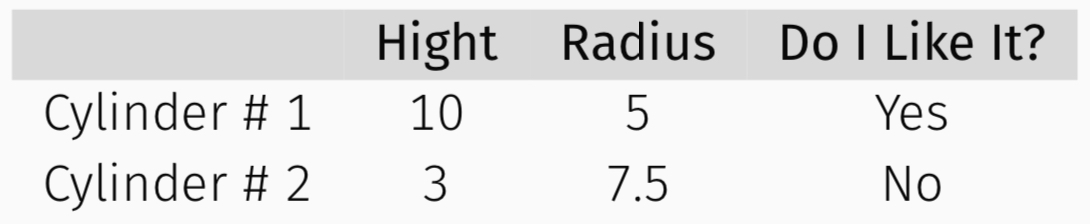
Each type of measurement is an attribute of the data. The number of attributes is the dimension of the data.
Types of Attributes in Tabular Data#
It’s vital to distinguish between classes of attributes based on the type of values they take on.
Quantitative attribute: a real valued number whose values can be ordered.
Example: Height is a quantitative attribute
Categorical attribute: a real valued or string with no inherent order among the values.
Example: “What kind of pet you have” is a categorical attribute
Is the data any good?#
Missing values: how do we fill in?
Wrong values: how can we detect and correct?
Messy format: how can we convert structured or semistructured data into tabular data?
Not usable: what if the data cannot answer the question posed?
Exploring the Data: Data Visualization#
Why Data Visualization?#
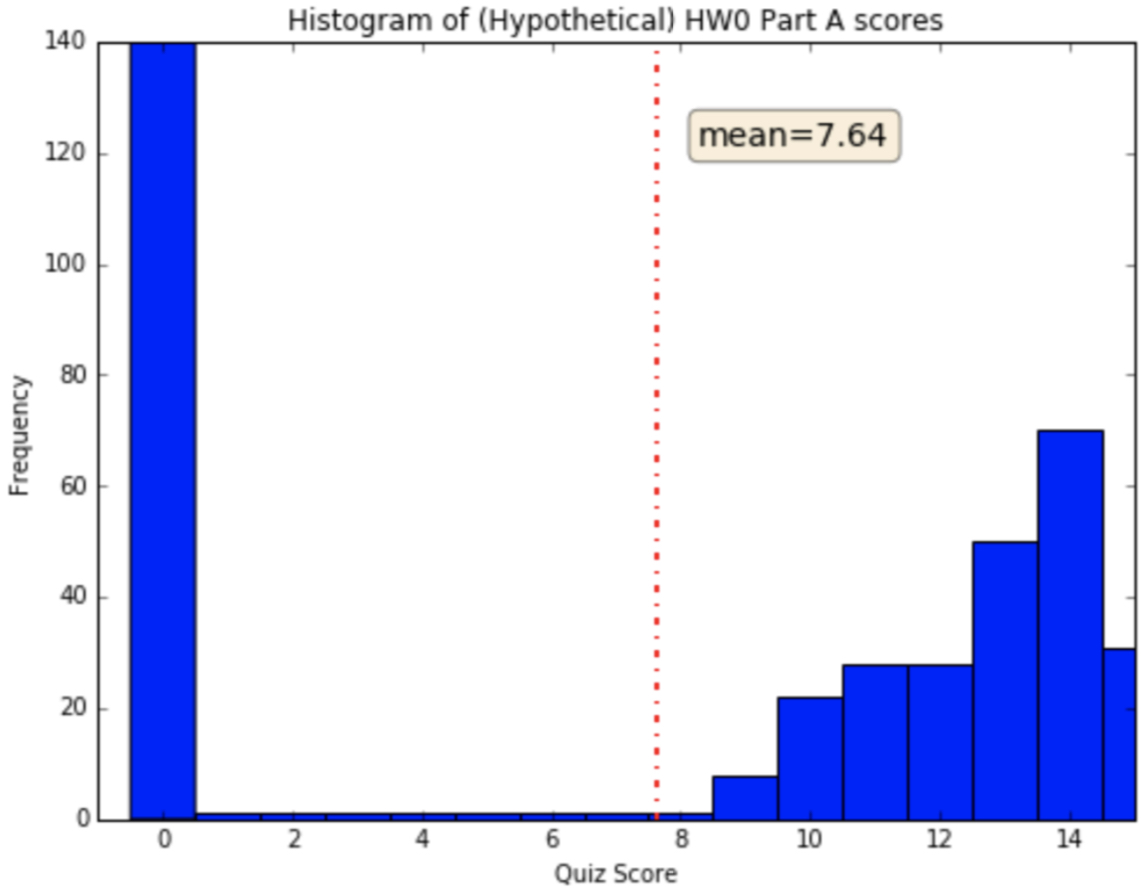
If I tell you that the average score for the final exam is: 7.64/15.
What does that suggest?
Why Data Visualization?#
If I then show you the following graph, what does it suggest?
What is Data Visualization Good For?#
Analyze:
Identify hidden patterns and trends
Help formulate/test hypotheses
Help determine the next step in analysis/modeling
What is Data Visualization Good For?#
Communicate:
Present information and ideas succinctly
Provide evidence and support
Influence and persuade
Types of Data Visualization#
What do you want your visualization to show about your data?
Distribution: how a variable or variables in the dataset distribute over a range of possible values.
Relationship: how the values of multiple variables in the dataset relate
Composition: how the dataset breaks down into subgroups
Comparison: how trends in multiple variable or datasets compare
Visualizing Distributions#
A histogram is a way to visualize how a quantitative attribute is distributed across certain values.

Note: Trends in histograms are sensitive to number of bins.
Visualizing Distributions#
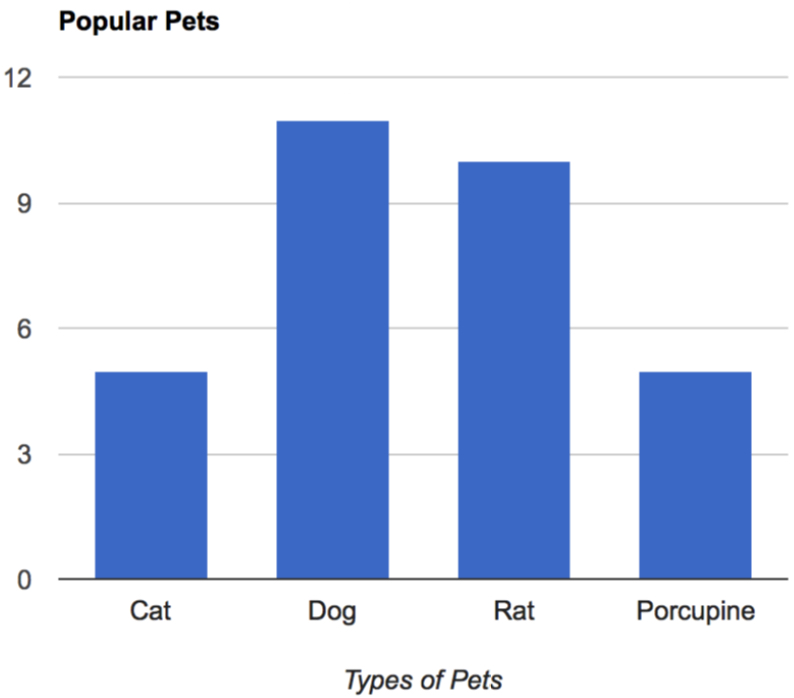
A bar chart is a way to visualize how a categorical attribute is distributed across certain values.
Visualizing Relationships#
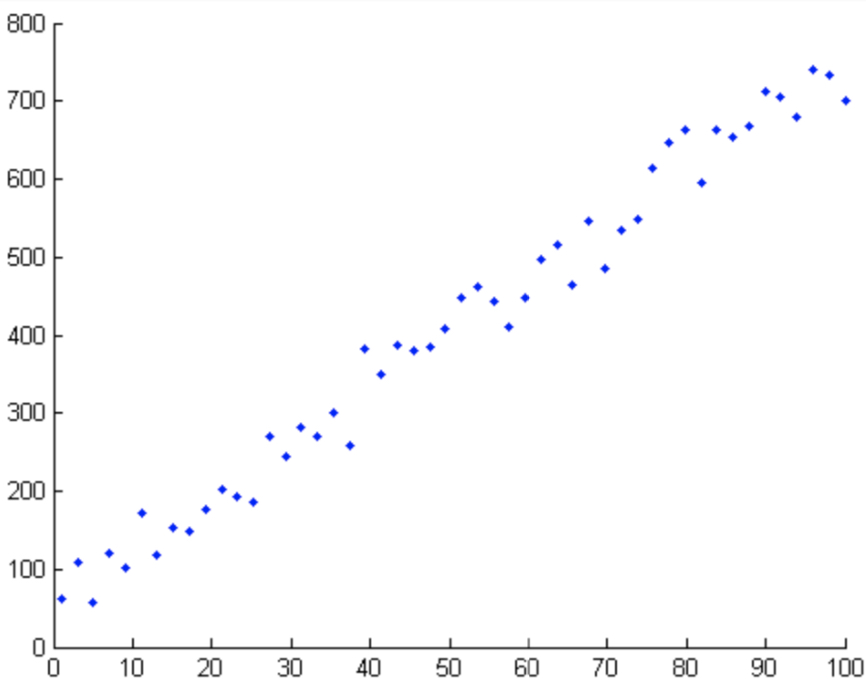
A scatter plot is a way to visualize the relationship between two different attributes.
Visualizing Comparisons of Subgroups#
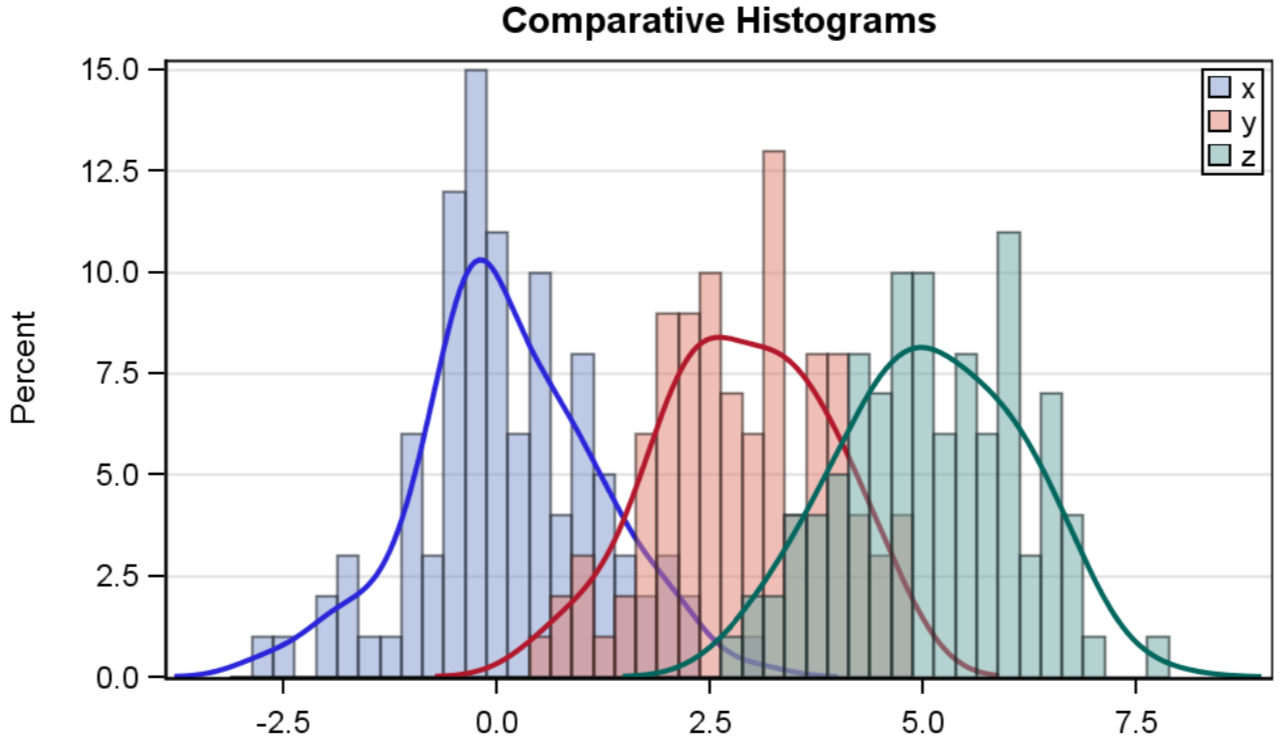
Plotting multiple histograms or curves on the same axes is a way to visualize how different subgroups of data compare.
For example: the following are the blood-glucose distributions of three subgroups within the dataset.
Generating Hypotheses#
We can see that birth weight is positively correlated with femur length.
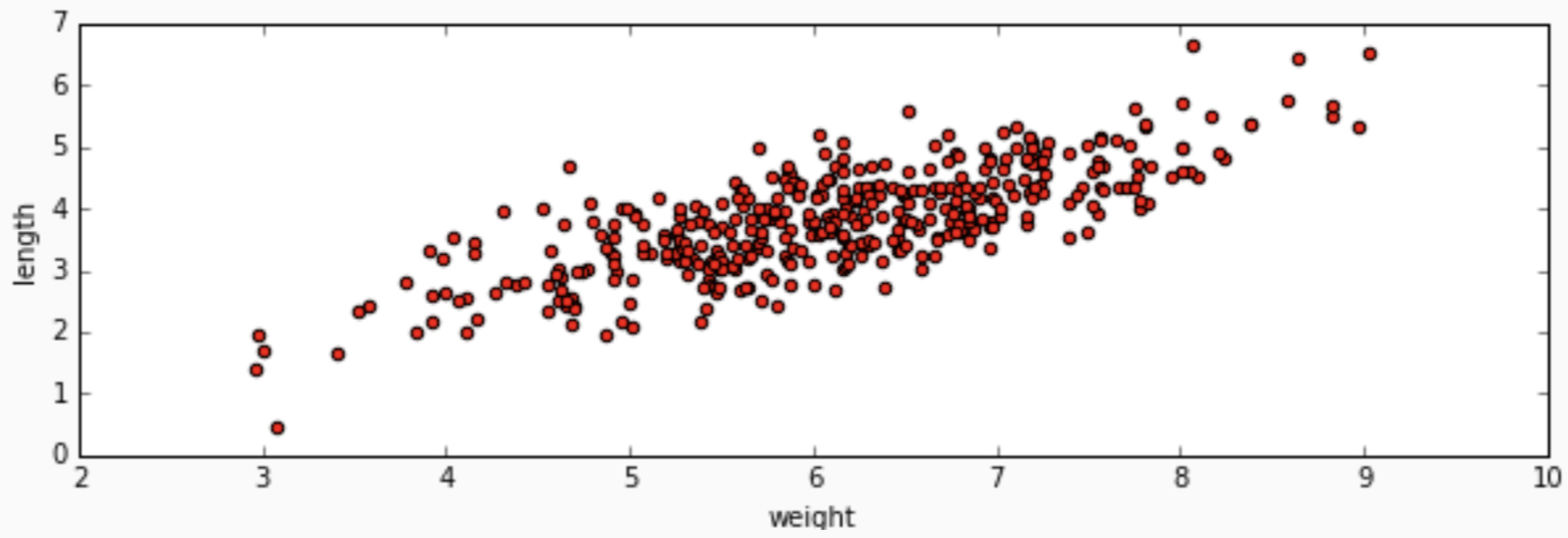
Can we describe exactly how they are correlated?
Generating Hypotheses#
We can see that types of iris seem to be distinguished by petal and sepal lengths.
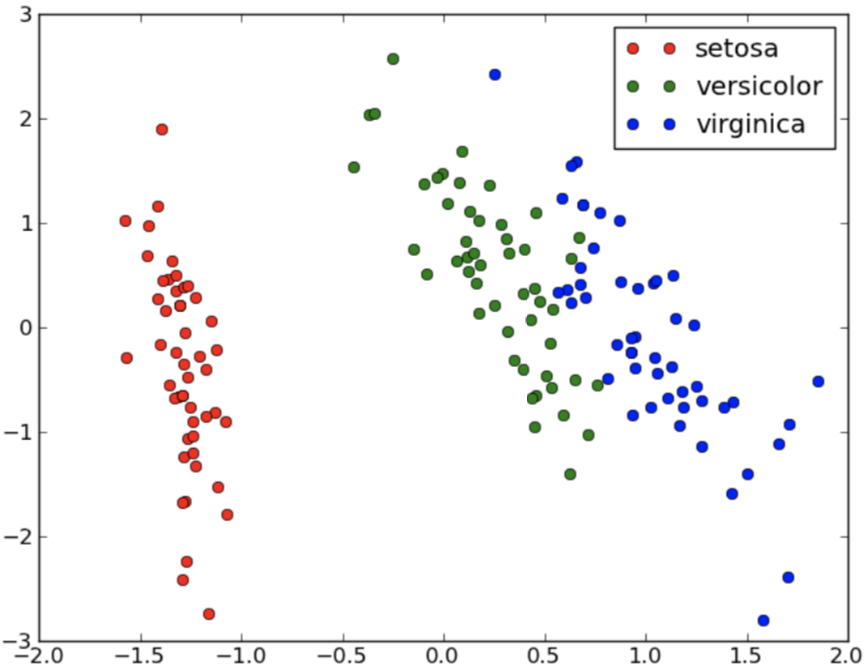
Can we predict the type of iris given petal and sepal lengths?
Computational Tools#
Computing Tools#
In all computation in this book, we will be using python, for which there are many robust and well documented libraries for machine learning and data science.
Specifically, we will use
Jupyter notebook- a web-based interactive development environment for Jupyter notebooks, code, and data.colab notebook- a Google web app for creating interactive document containing text, equations, live code and outputs.pandas- apythonlibrary for reading and manipulating datamatplotlib- apythonlibrary for data visualizationnumpy- apythonlibrary for manipulating numeric datascikit-learn- apythonlibrary with many machine learning modelskeras- apythonlibrary for deep learningautograd- apythonlibrary for automatic differentiationpymc3- a python library for performing sampling based inference on models
Jupyter or colab Notebooks#
What Does Colab Notebook Look Like?#
Go to https://colab.research.google.com/
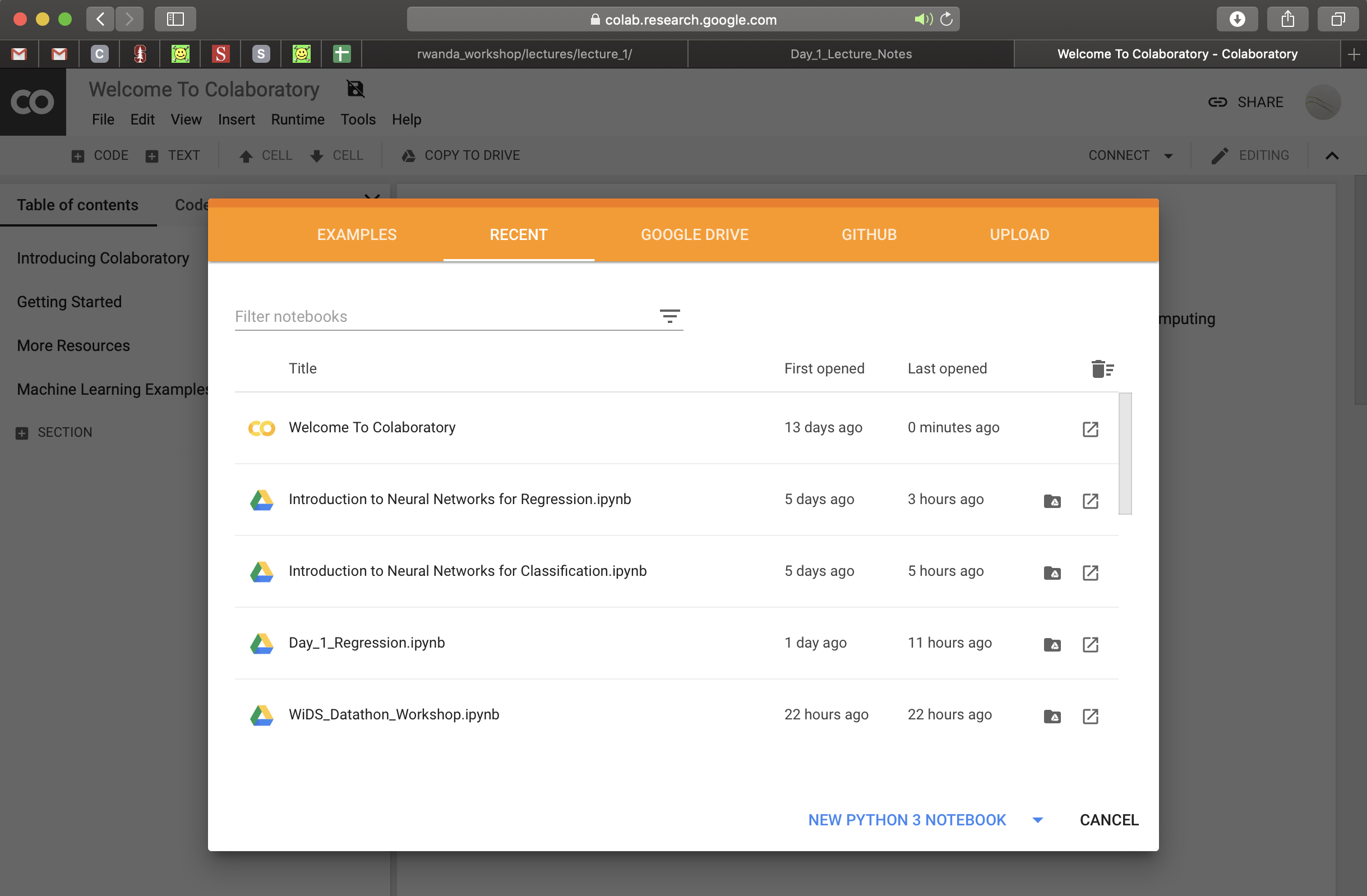
What Does Colab Notebook Look Like?#
Each notebook consists of blocks of cells. Each cell can be of two types: (1) rich text (Markdown) cells or (2) code cells.
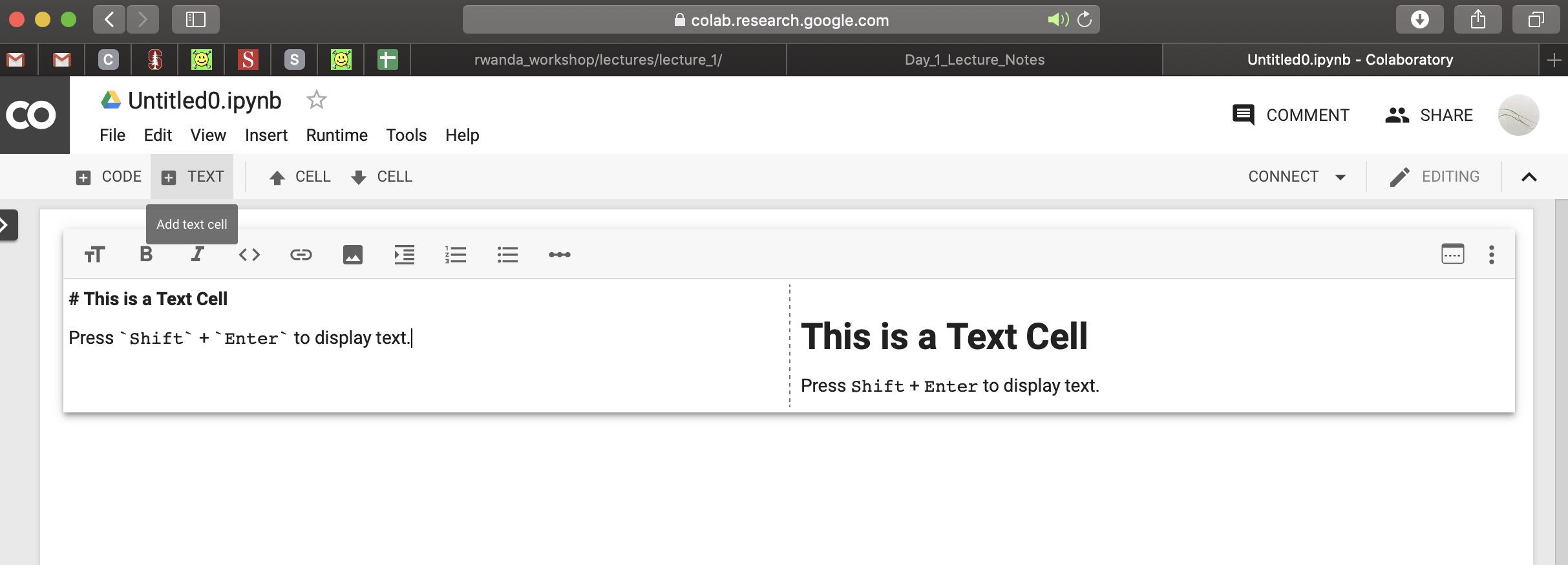
What Does Colab Notebook Look Like?#
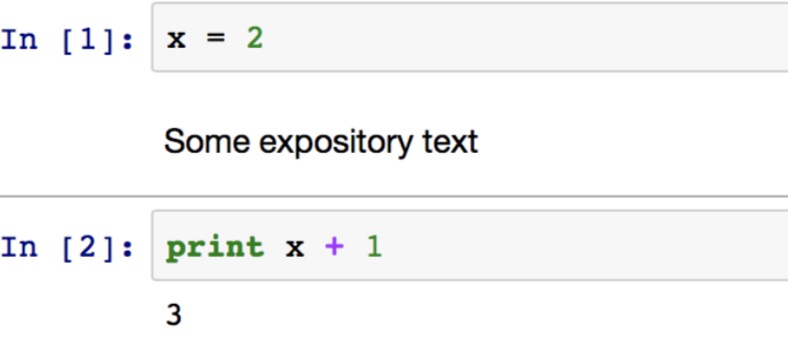
Code is executed by an “computational engine” called the kernel (IPython). The output of the code is displayed directly below..
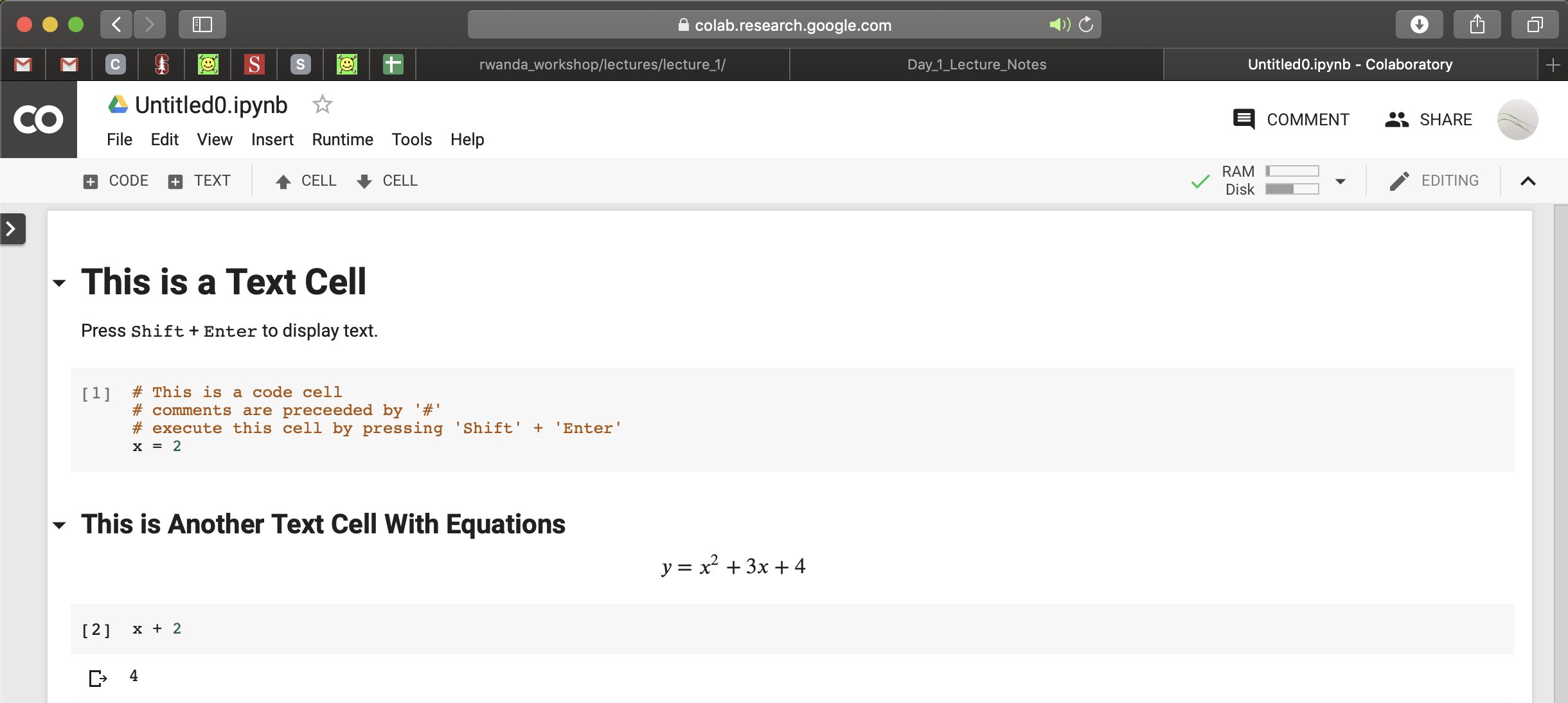
What Does Colab Notebook Look Like?#
Each cell can be executed independently, but once a block of code is executed, it lives in the memory of the kernel.
Learning python#
Many readings, cheatsheets and tutorials are available online for mastering general python programming as well as using python libraries for data manipulation/visualization.
Tips for learning a programming language:
Don’t read code line by line (at first)
Copy as much as possible (learn patterns and templates)
Don’t be afraid to play (trial and error)
Read documentation!
pandas: Reading and Manipulating Data#
pandas#
pandas provides ways of storing tabular data along with labels on the rows and columns.
To use any python library, we must include the line
import pandas as pd
After which we may use any function or object in this library using for example, pd.Series().
pandas Series#
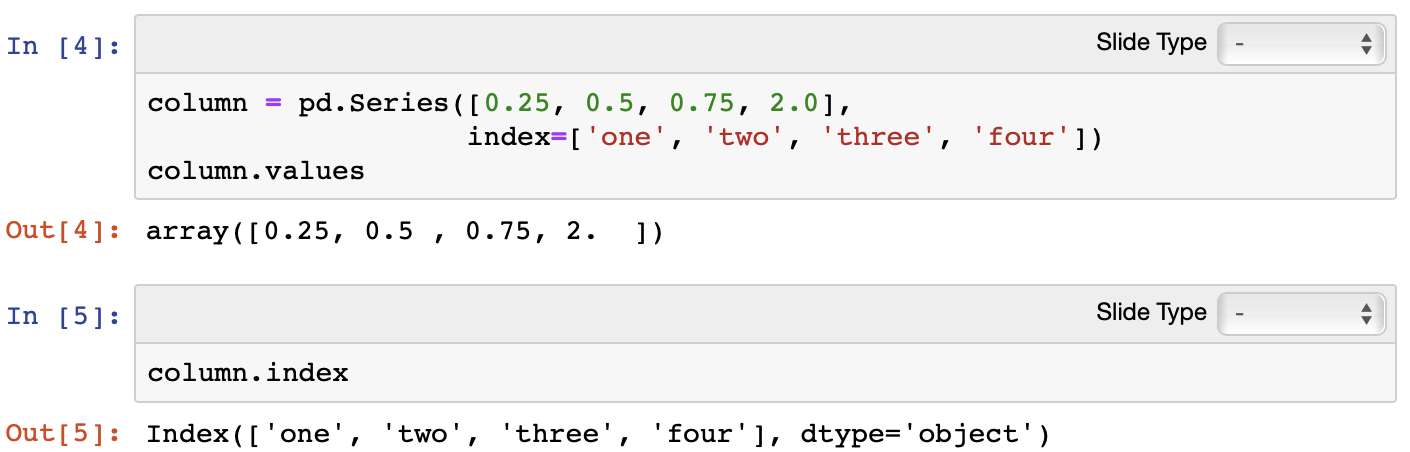
The pandas Series object stores a 1D array of data with an index object (labels).
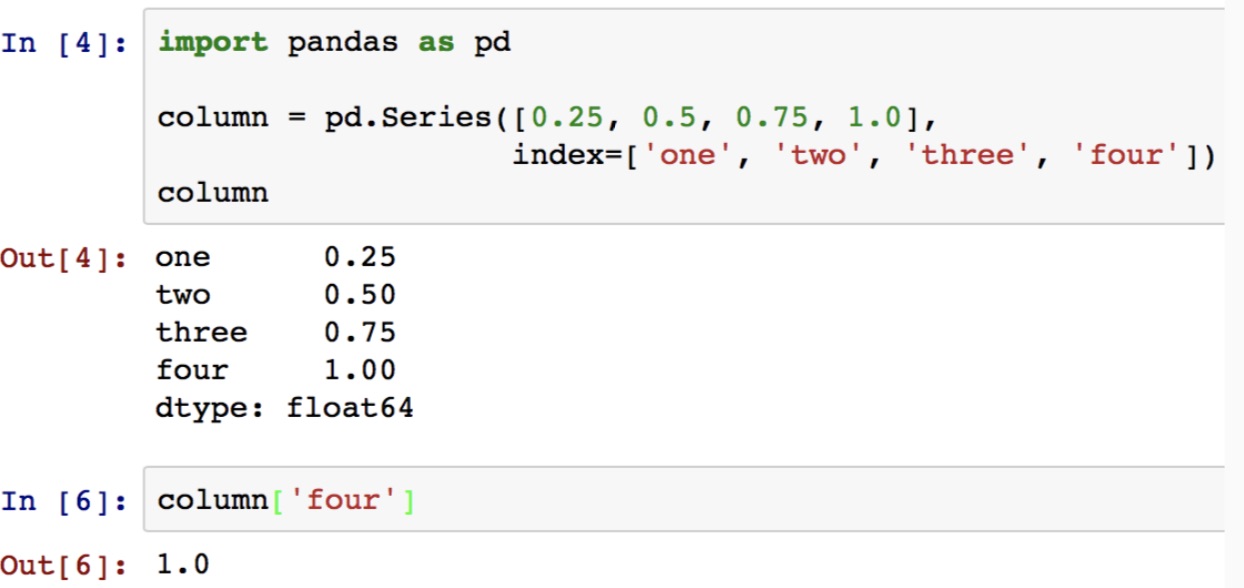
pandas Series#
Each pandas series has a .values and an .index attribute.
pandas DataFrames#
The pandas DataFrame object stores a 2D table of data with column and row index object (labels).
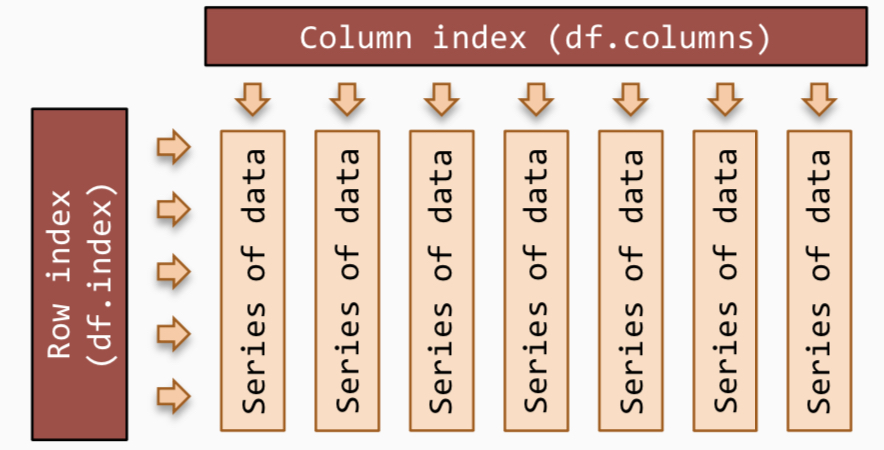
Each column in the data frame is a series.
Reading Data with pandas#
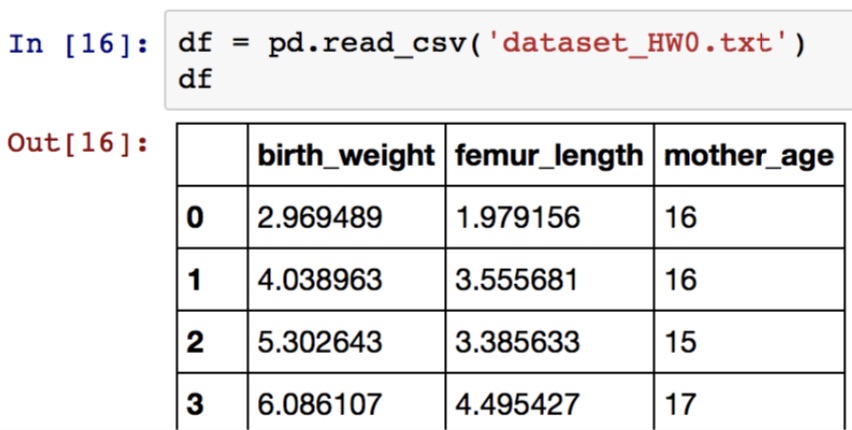
We can import tabular data in a csv file into a data frame:
Basic Data Exploration with pandas#
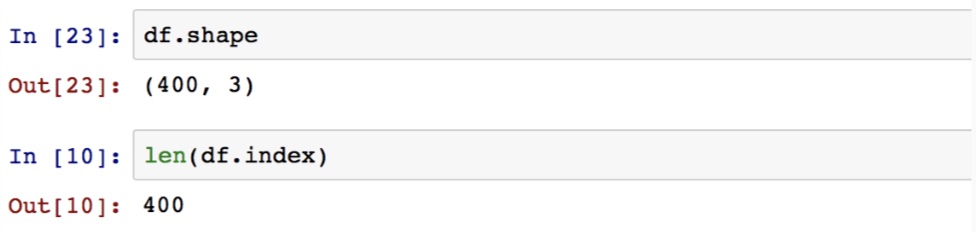
We should start by checking how large is the data.
We do this by checking the shape of the DataFrame.
Basic Data Exploration with pandas#
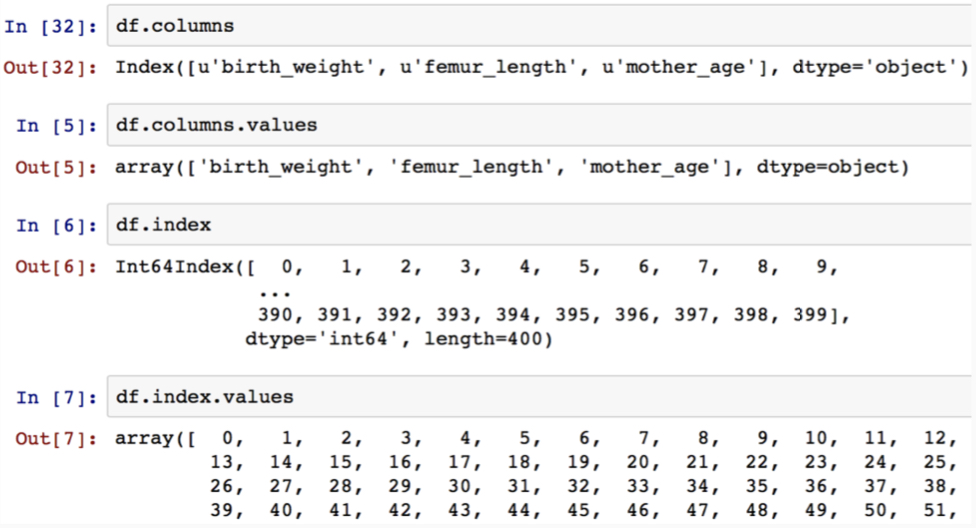
We should start by getting a rough sense of what’s in the data.
Basic Data Exploration with pandas#
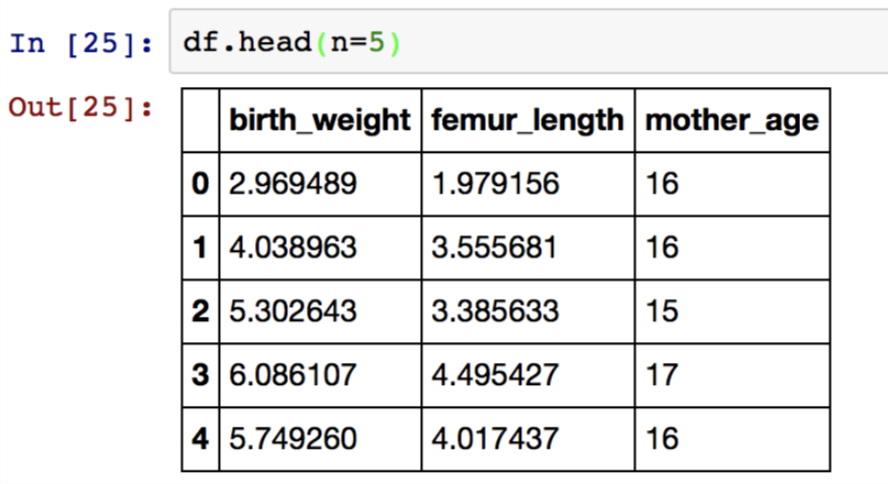
The .head() function returns the first N rows of your data frame!
Basic Data Exploration with pandas#
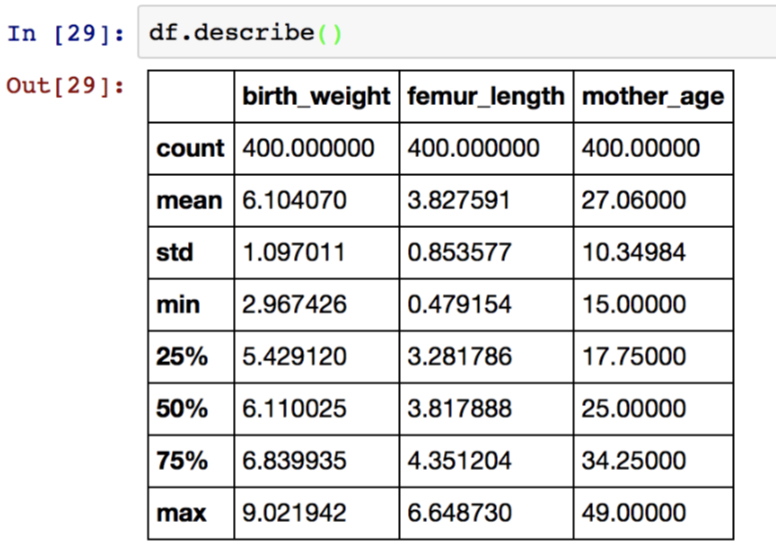
The .describe() function returns the descriptive stats for each numeric column as a data frame object!
Basic Data Manipulation with pandas#
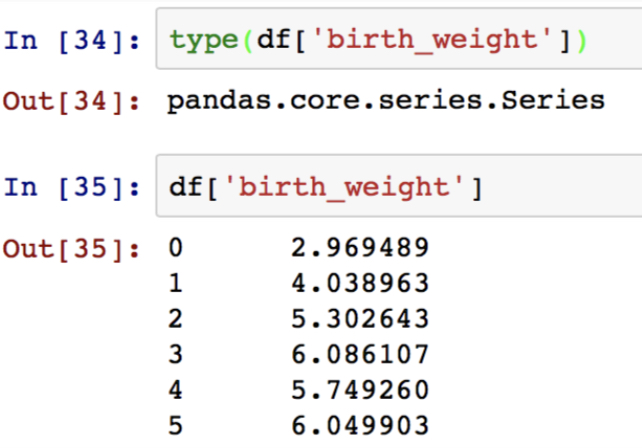
Accessing a column by label:
Basic Data Manipulation with pandas#
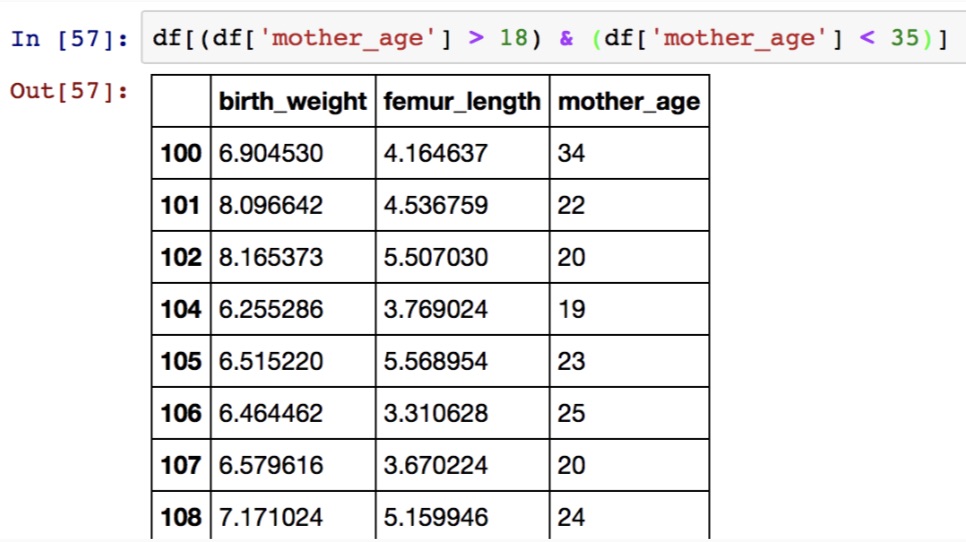
Accessing columns by criteria (filtering):
numpy: Numerical Computation#
numpy Arrays#
numpy is a package for scientific computation.
Notably, it provides an multi-dimensional array object which optimizes storing and manipulating data.
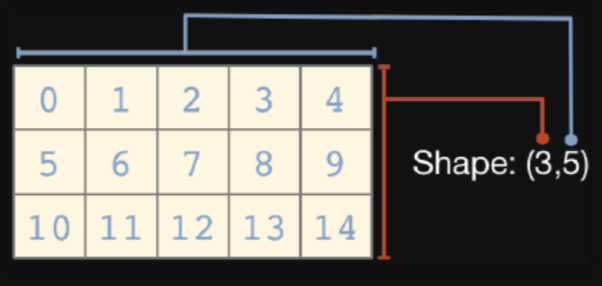
Each array has a shape, recorded as a tuple (n, m, ...).
1D Arrays#
Creating 1D arrays:
import numpy as np
my_array = np.array([1, 2, 3, 4])
my_array.shape
(4,)
Computing summary statistic for 1D arrays:
print('mean: {}, std: {}'.format(my_array.mean(), my_array.std()))
mean: 2.5, std: 1.118033988749895
2D Arrays#
Creating 2D arrays:
my_array = np.array([[1, 2], [3, 4]])
my_array
array([[1, 2],
       [3, 4]])
my_array.shape
(2, 2)
Indexing 2D Arrays#
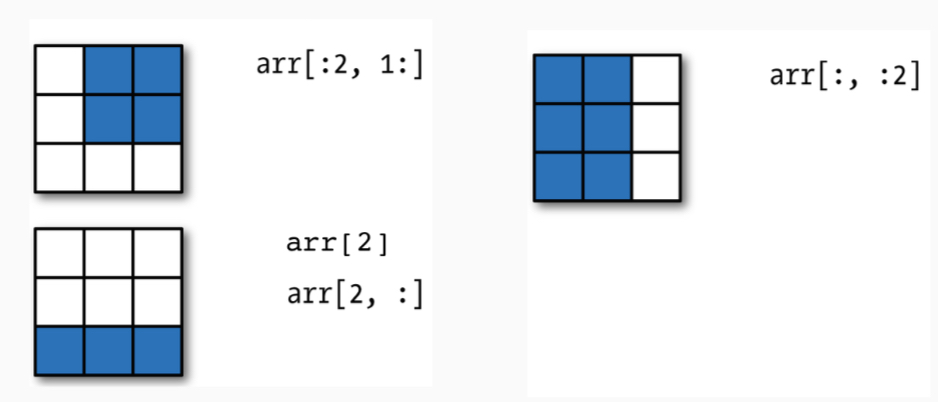
The element at the n-th row and the m-th column is indexed as [n, m]. Just like lists, you can also get multiple array values at a time:
Filtering Arrays#
You can get values from an array that satisfy a bunch of criteria!
my_array == 1
array([[ True, False],
       [False, False]])
my_array[(my_array == 1) | (my_array == 2)]
array([1, 2])
The numpy.linalg Module#
The numpy linear algebra functions provide implementation standard linear algebra algorithms:
A = np.diag([5, 6])
B = np.ones((2, 2)) + A

print(np.linalg.inv(A.dot(B)))
[[ 0.03414634 -0.00406504]
 [-0.00487805  0.02439024]]
The numpy.random Module#
The functions in random simulate sample from different statistical distributions:
sample = np.random.normal(0, 1, size=1)
sample
array([1.36111975])
sample = np.random.multivariate_normal([0, 0], np.eye(2), size=1)
sample
array([[0.96233174, 0.57055047]])
matplotlib: Visualization#
Data Visualization with matplotlib#
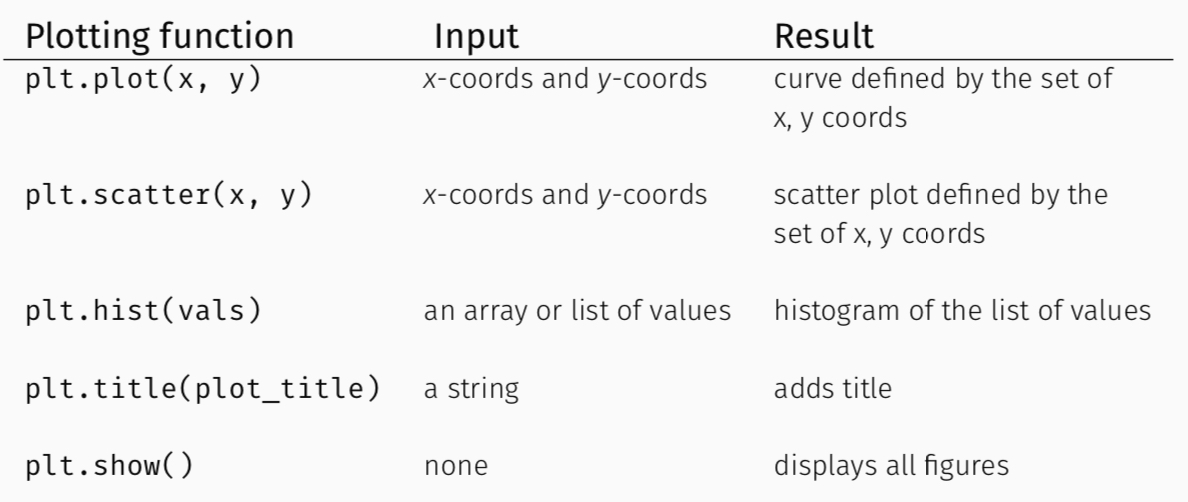
matplotlib is a plotting library, the pyplot module contains a set of functions especially useful for generating a wide range of visualizations:
import matplotlib.pyplot as plt
%matplotlib inline

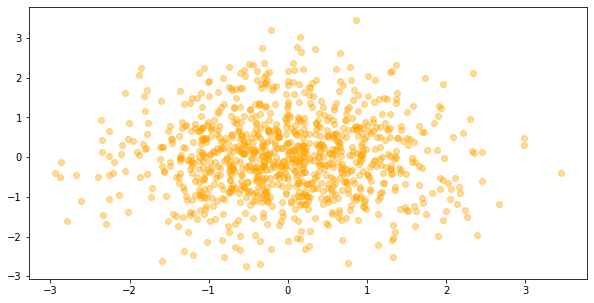
samples = np.random.multivariate_normal([0, 0], np.eye(2), size=1000)
fig, ax = plt.subplots(1, 1, figsize=(10, 5 ))
ax.scatter(samples[:, 0], samples[:, 1], color='orange', alpha=0.4)
plt.show()
Common Types of Visualizations#
Exercise: Simulation of Statistical Models#
Model of USPS Package Processing Time#
In this problem we want to model how much time it takes an USPS package processing system to process packages that arrive in a day.
Assumptions:
packages arrive randomly in any given hour according to a Poisson distribution. That is, the number of packages \(N\) is distributed as \(Poi(\lambda)\), with \(\lambda = 3\).
each package has a random size \(S\) (measured in \(in^3\)) and weight \(W\) (measured in pounds) jointly distributed as \(\mathcal{N}\left([120, 4], \left[\begin{array}{cc} 1.5& 1\\ 1 & 1.5 \end{array} \right] \right)\).
processing time \(T\) (in seconds) for each package is given by \(T = 60 + 0.6 W + 0.2 S + \epsilon\), \(\epsilon \sim \mathcal{N}(0, 5)\).
Tasks:
Compute the expected total weight and size of packages that arrive over a single day. Compute the expected average weight and size of packages that arrive over a single day.
Compute the expected number of packages that arrives in a single day.
Compute the expected processing time of a single package.
Compute the expected processing time of all packages over a single day.
Solution: Task 1
Before tackling the various computations, let’s get an intuitive understanding of the various distributions for number of packages, package weight and size etc. To do this, we visualize the distributions and ask ourselves if they realistically model the real-life quantities in which we are interested.
Number of Packages as a Random Variable
We first visualize the Poisson distribution that describes the number of packages that arrives in one hour. You can either plot the pmf of the Poisson distribution (available through scipy.stats.poisson ) as a function using .plot() or you can sample from the distribution using numpy.random.poisson then histogram the samples using .hist() to empirically approximate the pmf.
#parmater for the poisson distribution
mu = 3
#define x values that include most of the probability mass of the pmf
x = np.arange(sp.stats.poisson.ppf(0.01, mu), sp.stats.poisson.ppf(0.99, mu))
#get the poisson pmf function from scipy.stats
poisson_pmf = sp.stats.poisson(mu).pmf

#sample 500 values from numpy's poisson distribution
samples = np.random.poisson(mu, size=500)

fig, ax = plt.subplots(1, 2, figsize=(20, 5))
#plot the poisson pmf as a function
ax[0].plot(x, poisson_pmf(x), color='blue', alpha=0.7)
ax[0].set_title('Poisson pmf')
#approximate the poisson pmf by histogramming the samples
ax[1].hist(samples, bins=10, density=True, color='blue', alpha=0.4)
ax[1].set_xticks(range(samples.max() + 1))
ax[1].set_title('Histogram estimation of Poison pmf')
plt.show()
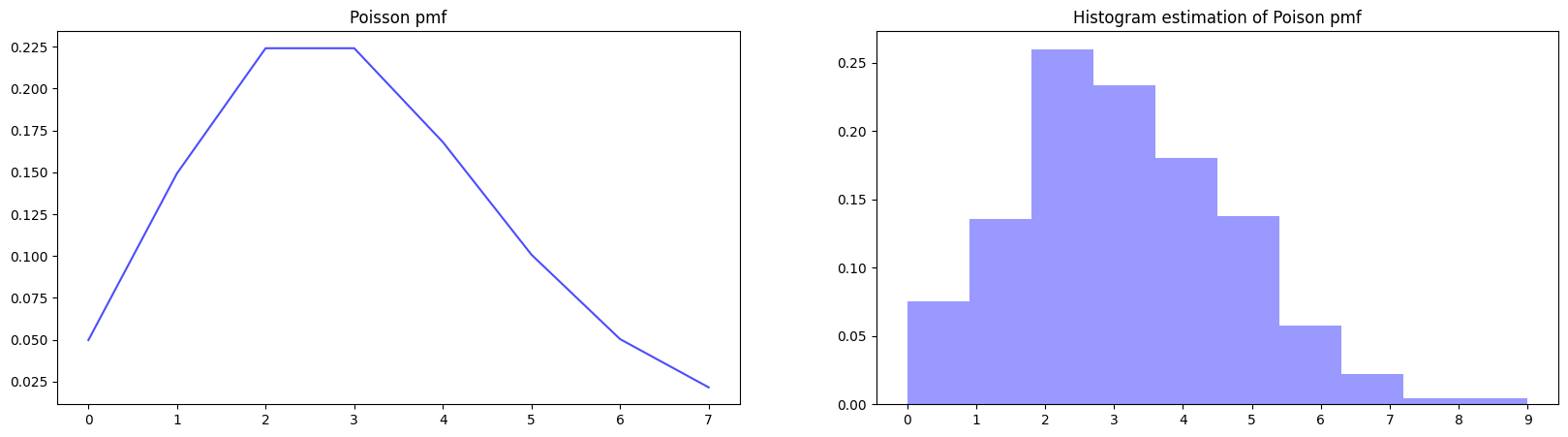
From the pmf, we can see that it’s more likely that 1-4 packages arrive in an hour and it’s much less likely that more than 5 packages arrive in an hour.
Size and Weight of the Packages as Random Variables
Again, to visualize the bivariate Gaussian distribution for the size and weight, we can visualize the pdf as a bivariate function (using heatmaps and contour maps) or we can sample from the distribution and visualize a scatter plot (the scatter plot is an approximation of the pdf).
#mean of the multivariate Gaussian
mu = [120, 4]
#covariance matrix of the multivariate Gaussian
Sigma = np.ones((2, 2)) + 0.5 * np.eye(2)

#define points that include most of the probability mass of the pdf
x, y = np.mgrid[114:126:.1, -2:10:.01]
pos = np.dstack((x, y))
#get the value of the pdf at those points
z = sp.stats.multivariate_normal(mu, Sigma).pdf(pos)

#sample 1000 points from numpy's multivariate normal distribution
samples = np.random.multivariate_normal(mu, Sigma, size=1000)

fig, ax = plt.subplots(1, 2, figsize=(20, 5))
#plot the gaussian pdf as a heat-map
ax[0].contourf(x, y, z, levels=14, cmap='Reds')
#plot the gaussian pdf as a countour map
ax[0].contour(x, y, z, levels=14, linewidths=0.1, colors='red')
ax[0].set_title('Gaussian pdf')
ax[0].set_xlabel('size')
ax[0].set_ylabel('weight')
#approximate the gaussian pdf by scatter plotting the samples
ax[1].scatter(samples[:, 0], samples[:, 1], color='red', alpha=0.2)
ax[1].set_title('Scatter plot estimation of a Gaussian pmf')
ax[1].set_xlabel('size')
ax[1].set_ylabel('weight')
plt.show()
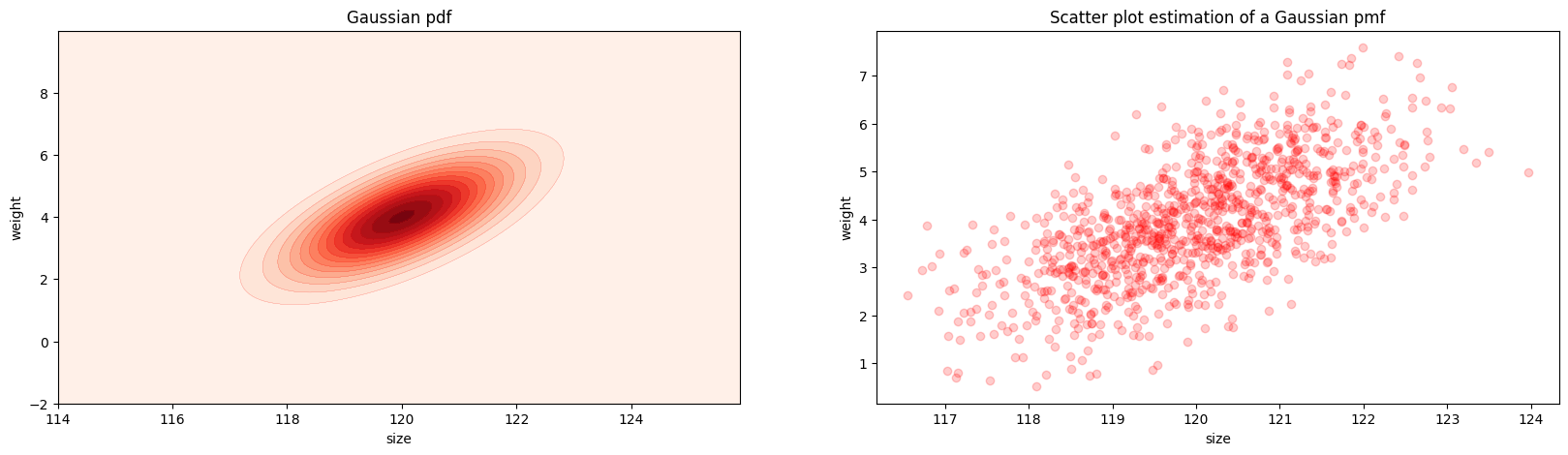
We see that the most likely values under this Gaussian distribution are around 120 \(in^3\) and 4 lbs. This Gaussian distribution is skewed diagonally towards the right. What does this mean about the relationship between the two random variables: size and weight?
Important Exploration for Intuition: Can you see which components of the covariance matrix control which aspect of the shape of the Gaussian pdf? Specifically, which aspect of the shape do the diagonal entries control? Which aspect of the shape do the off diagonal entries control? Change some of the values in \(\left[\begin{array}{cc} 1.5& 1\\ 1 & 1.5 \end{array} \right]\) and see how the shape of the pdf is affected.
The expression for the total weight and size of packages is:
Analytic Solution Note that the total weight \(W_{\text{total}}\) (and respectively, size) depends on both the random variables \(W_{n}\) and the random variables \(N_{m}\). Thus, when we take the expected (or “average”) value of \(W_{\text{total}}\) (and respectively, size), we must take the expectation with respect to both \(W_{n}\)’s and \(N_{m}\)’s:
Recall the definition of the expected value of a function of a random variable, \(x\)
where \(p(x)\) is the pdf of the random variable \(x\).
So, we can write (with slight abuses of notation for simplicity):
where \(p\left(\{W_n\}, \{N_m\}\right)\) is the joint distribution of the \(W_{n}\)’s and the \(N_{m}\)’s. As you’ll see, we don’t need to know anything about the distribution \(p\left(\{W_n\}, \{N_m\}\right)\), or compute any of these integrals. The only fact of integration we need to recall is that the integral is a linear operator, that is, integration is interchangeable with finite sums. I.e. we can interchange the order of the integral and the first summand:
Now, since the second summand \(\sum_{n=1}^{N_m}\) involves the random variable \(N_m\) over which we are integrating, we cannot push the integral past this summand. Fortunately, it is a property of expectations that the expected value of a random sum of random variables (with the identical means) is the product of the expected length of the sum and the expected value of one of the random variables. That is,
But we modeled \(N_m\) as a Poisson variable and so its mean is \(\lambda=3\); and we modeled \(W_1\) as a normal variable with mean 4. Thus, we have that
That is, the expected (or average) total weight processed by this USPS facility is 288 lbs.
Solution via Simulation If we were unable (or unwilling) to compute these expectations analytically, we could have estimated \(\mathbb{E}_{\{W_n\}, \{N_m\}}W_{\text{total}}\) through simulation. That is, we
simulate (sample) the number of packages that would arrive in a hour, and then repeat this 24 times
for each package in the 24 hours, we simulate (sample) a size and a weight
we sum up the size and the weight for the total over 24 hours
repeat this entire process a large number of times and compute the averaged total weight over the repetitions
#repeat a 24 hr simulation for 100 times
total_size_weight = []
for n in range(100):
    #simulate number of packages in 24 hours
    samples = np.random.poisson(3, size=24)
    total_packages = samples.sum()
    #for each package sample a size and weight
    mu = [120, 4]
    Sigma = np.ones((2, 2)) + 0.5 * np.eye(2)
    size_weight_samples = np.random.multivariate_normal(mu, Sigma, size=total_packages)
    #sum up the weights and sizes separately and add this total to our list of totals
    total_size_weight.append(size_weight_samples.sum(axis=0))

#average the total size and weight over 100 simulations
total_size_weight = np.array(total_size_weight).mean(axis=0)

#store both averages in a pandas dataframe (for pretty output)
total_df = pd.DataFrame(data=total_size_weight.reshape((1, -1)), columns=['total size', 'total weight'])
total_df
   total size  total weight
0  8566.29009    287.018862
This is pretty close to what we predicted analytically for the total weight!
Not covered here: the expected total size, and the expected average weight and size of a package.
Solution: Task 2
Analytic Solution The expression for the total number of packages that arrives in a single day is:
where \(N_m\) is the number of packages that arrives in a single hour. Note that \(N_m \sim Poi(3)\).
Thus,
Again, we can approximate \(\mathbb{E}_{\{N_m\}} N_{\text{total}}\) through simulation.
Solution: Task 3
Analytic Solution
The expression for a single package is
Thus, \(T\) is a random variable that depends on \(W\), \(S\) and \(\epsilon\). So when we compute the expected value of \(T\), we need to take the expectation with respect to \(W\), \(S\) and \(\epsilon\):
The function sample_total_time() in Task 4 simulates \(T\) for every package, so we could also have estimated \(\mathbb{E}_{W, S, \epsilon}[T]\) by simulation.
Solution: Task 4
Processing Time as a Random Variable
What about the distribution of the processing time as a random variable? This is more complex since total processing time over a day, \(T_{\text{total}}\), is a function of other random variables,
As such, we don’t know what exactly is the distribution of \(T_{\text{total}}\) (i.e. it’s not a normal distribution, it’s not Poisson etc). In this case, we can’t easily plot the pdf of \(T_{\text{total}}\) as we did for the other random variables. We can, however, still approximate the pdf by sampling from the distribution of \(T_{\text{total}}\). Rather than sampling from a specific pdf (in this case we don’t know what it is), we can “build” samples of \(T_{\text{total}}\), by sampling all relevant random variables on which \(T_{\text{total}}\) depends and then summing them appropriately to obtain samples of \(T_{\text{total}}\).
def sample_total_time():
    '''
    function to simulate one sample of total processing time T_total
    '''
    #sample packages per hour for 24 hours
    mu = 3
    samples = np.random.poisson(mu, size=24)
    #sum hourly number of packages to get total number over 24 hours
    total_packages = samples.sum()
    #for each package sample a size and weight
    mu = [120, 4]
    Sigma = np.ones((2, 2)) + 0.5 * np.eye(2)
    size_weight_samples = np.random.multivariate_normal(mu, Sigma, size=total_packages)
    #sample epsilons
    epsilons = np.random.normal(0, 5**0.5, size=total_packages)

    #compute total processing time for all packages
    T_total = (60 + 0.6 * size_weight_samples[:, 1] + 0.2 * size_weight_samples[:, 0] + epsilons).sum()

    return T_total
#simulate 2000 samples of total processing time
number_of_samples = 2000
total_times = []
for n in range(number_of_samples):
    total_times.append(sample_total_time())

#visualize the total processing time samples
fig, ax = plt.subplots(1, 1, figsize=(10, 5))
ax.hist(total_times, bins=50, color='green', alpha=0.4)
ax.set_title('Histogram of total processing time')
plt.show()
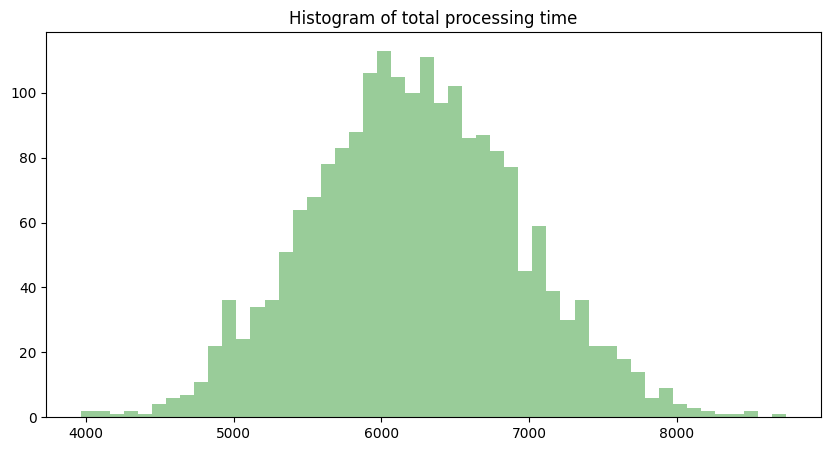
it looks like that the most likely total processing time over a day is just above 6000 seconds, or 1.67 hours.
Analytic Solution
The expression for the total processing time is
Thus, \(T_{\text{total}}\) is a random variable that depends on the variables \(\{N_m\}\), \(\{W_n\}\), \(\{S_n\}\) and \(\{\epsilon_n\}\). So when we compute the expected value of \(T\), we need to take the expectation with respect to all the variables on which \(T_{\text{total}}\) depends:
where we used the fact that \(\mathbb{E}_{\text{all vars}}[60 + 0.6 W_n + 0.2 S_n + \epsilon_n] = 86.4\) from Task 3.
Solution via Simulation
Above, we simulated samples from the distribution of \(T_{\text{total}}\). So we can use the empirical mean of the samples in order to estimate the \(\mathbb{E}_{\text{all vars}}[T_{\text{total}}]\).
#estimate the empirical mean of the total processing time
np.mean(total_times)
6226.220272969424
This looks close to our analytically computed expected value!
The Main Take-away: It is often the case that we are interested in computing some statistics (like the average) of a quantity that is a function of random variables (like total processing time, which is a function of weight, size etc). If we know the analytical form (the formula for the pdf or pmf) of the random involved and if the function is relatively simple, we can often compute these statistics analytically (by computing the various integrals exactly).
When analytical computation is intractable, we want to simulate samples from the quantity of interest (e.g. simulate samples from total process time) and then estimate the statistic empirically using samples.